What is an MCP client?
An MCP client is a subprogram of an AI agent application, and it communicates with an MCP server to get information and carry out tasks.
学习目标
阅读本文后,您将能够:
- Explain how MCP clients and servers interact
- Understand MCP hosts
- Get started with deploying MCP clients and servers on Cloudflare
复制文章链接
What is an MCP client?
A Model Context Protocol (MCP) client is a computer program that, as part of or at the direction of an AI agent, makes requests of an MCP server. The information that the MCP client obtains from the MCP server helps the AI agent make decisions or carry out tasks. Think of an MCP client as being like an assistant that can book restaurant reservations or follow up with people on behalf of their employer (the AI agent).
Suppose Acme Corp. builds an AI agent that can autonomously order furniture sets for children's bedrooms in response to simple customer prompts like, "I would like to furnish my nine-year-old's room." In order to find the best options, the AI agent would need information about what children's furniture is available, its prices, and the dimensions of the items of furniture as compared to the typical bedroom. If furniture manufacturers expose this information using MCP, the AI agent can task an MCP client with requesting the desired information directly.
MCP clients operate within MCP hosts: an MCP host is an AI agent or application. MCP is not like the client-server model on which the Internet was built, in which the "clients" were originally assumed to be discrete devices with their own IP addresses. Rather, MCP clients, hosts, and servers may all be running on the same machine, although this is not always the case.
How MCP hosts work
An MCP host is an agentic AI application. Along with its other functions, the application contains one or more clients, which are subsidiary programs of the host. The clients help the host obtain necessary information or carry out actions to respond to end user prompts. Each client communicates directly with one MCP server. Additional server connections require instantiating more clients.
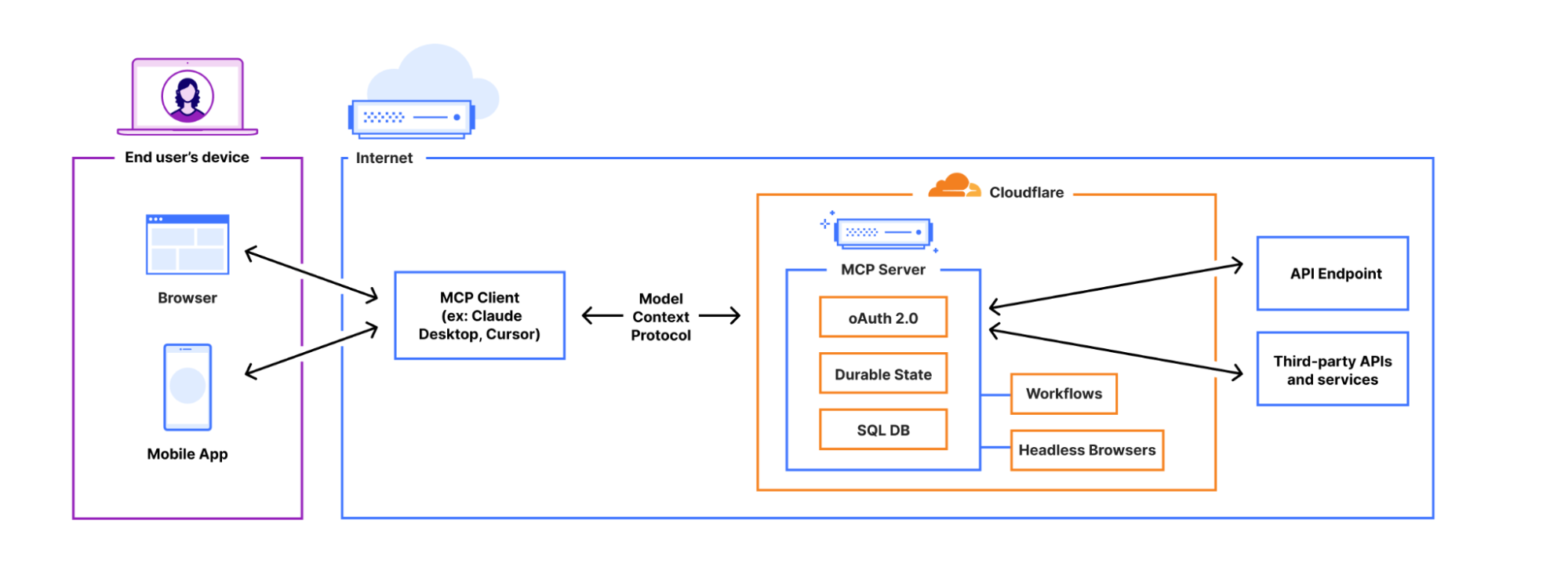
This diagram shows how MCP clients and servers interact under the hood of a user-facing app when MCP servers are hosted on Cloudflare.
From the end user perspective, this all takes place under the hood: what they see is that they enter a prompt into an AI application, and the application replies or carries out their requests. But behind the scenes, the application relies at least partially on MCP clients and servers to get the job done.
What is an MCP server?
An MCP server is a software program that supports the usage of MCP and makes information available to MCP clients. MCP servers take an active role in helping MCP clients fulfill their prompts, requesting more context where necessary, for instance.
MCP servers and MCP clients can run on the same physical machine. Or, they can be separate devices that connect remotely to each other over the Internet. An MCP server can be hosted on a web server (or on Cloudflare, as in the diagram above) but it does not have to be.
What are the core features of MCP servers?
MCP servers make several features available to MCP clients. These features help MCP clients carry out their tasks.
- Tools: These are functions that can be executed to help carry out prompts. An MCP server tool could be a function that calls an API, for example.
- Resources: Resources are saved sources of read-only data, such as documents, API documentation, or knowledge base articles.
- Prompts: Stored, structured templates for calling specific tools and resources.
What are the core features of MCP clients?
MCP clients also make features available to MCP servers, which can request information or get clarity from clients using these features.
- Elicitation: Once a connection is initiated, the server may need more context or information in order to fulfill the client's request. The server uses the Elicitation feature to get this information from the client, which may in turn ask the user.
- Roots: Clients may ask servers to focus on certain subdirectories of files to ensure the server generates a relevant response. Imagine in the example above a client asks the server to focus on
file:///home-goods/furniture/childrens-furniture/. This way the server is less likely to provide the client with irrelevant information that does not help satisfy the user prompt, such as information about home goods in general or adult-sized beds. - Sampling: The server can send a request to the client for the AI application to complete a task.
How to build an MCP server or MCP client with Cloudflare
Cloudflare enables developers to build, test, and deploy their own MCP clients and servers as part of developing their own AI agents. Developers can build on their local devices and deploy to Cloudflare, or build via their GitHub accounts. Deploying an MCP server or client on Cloudflare means that they can expose tools and data to agents without self-hosting and in milliseconds, on a global network that is within approximately 50 milliseconds of 95% of the Internet-connected population globally.
Authentication via OAuth can be built into MCP servers as well. Without authentication, anyone can connect and use the server. With authentication, only authorized parties can do so. Authentication therefore can help keep data on an MCP server confidential and secure.
For a full tutorial on how to build a remote MCP server with Cloudflare, see Cloudflare's MCP developer docs.